Monitor lifecycle
This documentation explains the processes executed by the Sentinela monitoring platform, focusing on searching for issues, updating their data, and identifying when issues are solved. The provided Example Monitors implement various scenarios to help understand these processes.
In this example, the monitor Count Rule Monitor is used to illustrate the monitor lifecycle. This monitor creates multiple issues with a value field that fluctuates randomly, demonstrating how issues are created, updated, and resolved based on their data.
Issue options and issue data type
Each issue is expected to have two fields:
- id: A unique identifier for each issue.
- value: A numeric field.
The issue_options configuration model_id_key specifies that the id field will serve as the identifier for issues. Different data with the same id represent the same issue.
Search process
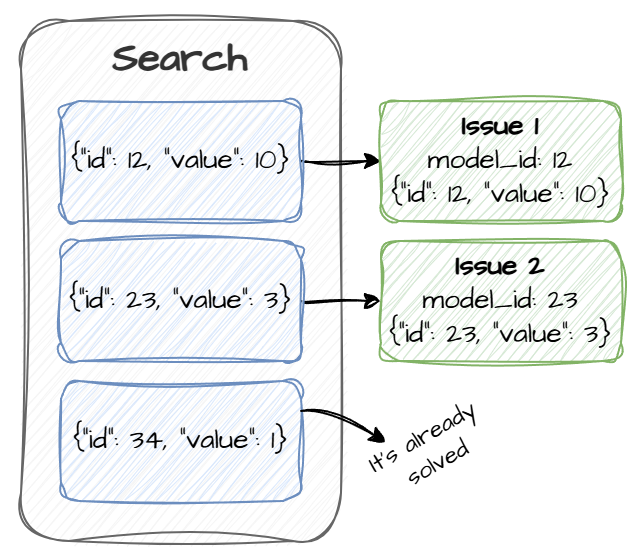
Sentinela calls the search function, which returns a list of issues data. Each issue data contains the id and value fields and is generated randomly.
Example of returned issues data:
- {"id": 12, "value": 10}
- {"id": 23, "value": 3}
- {"id": 34, "value": 1}
Sentinela filters out issues considered solved. An issue is considered solved if its value meets the resolution criteria (e.g., value = 1 in this case). Remaining issues data are used to create Issue objects, assigned a model_id equal to the id of each issue data, and stored in the database.
In the example:
- Issues with data {"id": 12, "value": 10} and {"id": 23, "value": 3} are created.
- The issue with {"id": 34, "value": 1} is discarded.
Update process
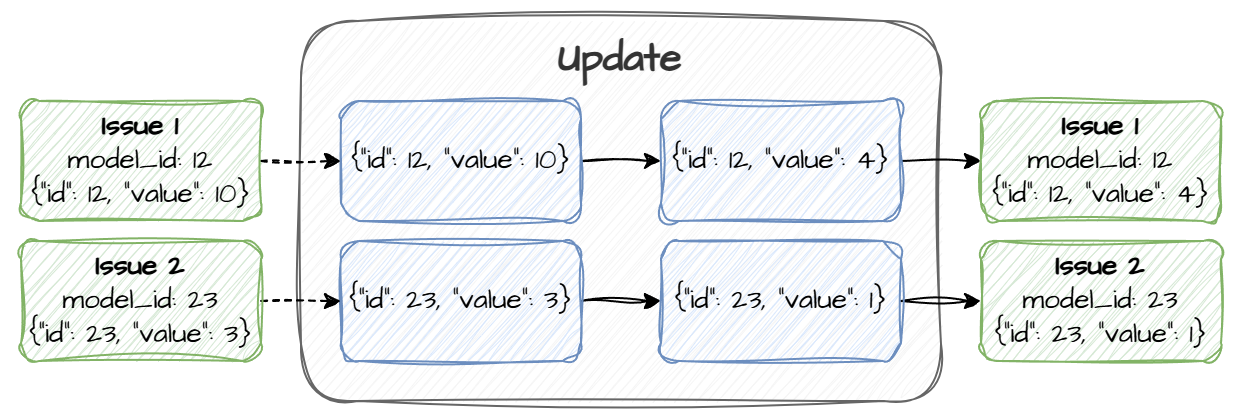
Sentinela retrieves the issues data for all active issues in the Monitor. This data includes the id and value fields for each active issue.
The update function updates the data accordingly and returns it. Sentinela will, then, use this information to update the Issues.
Example of updates:
- {"id": 12, "value": 10} is updated to {"id": 12, "value": 4}
- {"id": 23, "value": 3} is updated to {"id": 23, "value": 1}
Sentinela maps the updated issues data to their respective Issue objects by their model_id and the id field in the data. The corresponding Issues are updated in the database with the new value.
Solve process
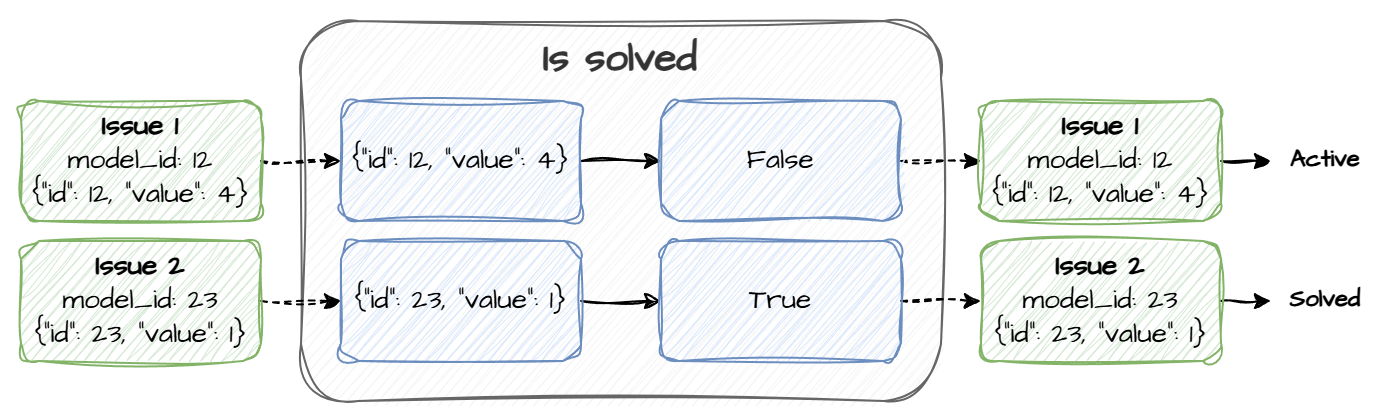
Similar to the update process, Sentinela retrieves issues data for all active issues.
The is_solved function is executed for each issue data to determine whether it is solved.
Example of resolution checks:
- For {"id": 12, "value": 4}, the function returns False.
- For {"id": 23, "value": 1}, the function returns True.
Any issue detected as solved (i.e., is_solved returns True) has its status changed to solved, and it is no longer considered as active.